Custom Search
|
|
 
|
||
|
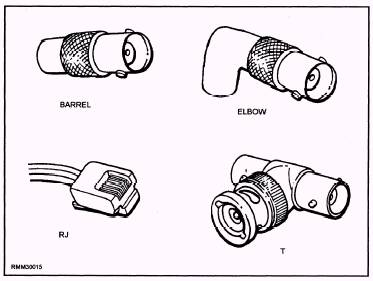
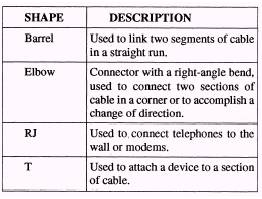
Network Interface Card and Cabling To attach personal computers to the LAN, you must install a network interface card (NIC) into an empty expansion slot in the PC, install the appropriate software, and attach the network cable to the NIC. The other item you need to consider is what type of connector to use. But before deciding the type of connector to use, you need to know what type of cable and architecture you will be using. The cables may be twisted-pair cable, fiber optic cable, or coaxial cable. l Twisted-pair cable The twisted-pair cable is easy to install and costs little on a per-foot basis. In some cases existing telephone cable may be used. Its disadvantages include limitations in capacity and speed. It is also susceptible to electrical interference unless it is shielded. l Fiber optic cable Fiber optic cable is the best choice if a secure network is needed. Because the cable transmits light, the transmissions are immune to interference caused by electrical or electronic devices. Also, if your network will run through an area of heavy industrial activity or a work place with strong radio frequency interference, fiber optic cable is the most appropriate choice. Other advantages of the fiberoptic cable are that it lasts longer than other cable and can carry many more channels. Its disadvantages include its high price, poor connectivity, and low flexibility. l Coaxial cable Coaxial cable, also called coax, networks have gained in popularity because of their use in cable television. The quantities of cable and connectors produced for cable television have greatly reduced the prices of these components for network users. Coaxial cable comes in various thicknesses and is designated by a number: RG-11, RG-58, RG-59, RG-62, etc. You can use either baseband or broadband transmission methods with coaxial cable. Baseband coaxial systems, which transmit digital signals unchanged over a single channel, have several advantages. They are inexpensive, simple, easy to install, and have low maintenance. They also allow very high data transmission rates. One disadvantage is they are limited to transmitting digital signals only. In contrast, broadband coaxial systems require the digital signal to be converted to an analog signal before transmission and then back to digital by modem at the receiving device. Broadband systems support data, voice, and video signals that may be transmitted simultaneously. Disadvantages of broadband systems are their higher installation costs and complex maintenance. Connectors The connector provides the physical link between two components. For example, a connector can link a cable and a NIC, a cable and a transceiver, or two cable segments. Connectors differ in their shape, size, gender, connection mechanism, and function. These features influence and determine where a connector can be used. Where necessary, special adapters may be used for connections involving different connector combinations. Connectors also differ in how sturdy they are, how easily and how often they can be attached and detached, and in how much signal loss there is at the connection point. The type of connector needed in a particular situation depends on the components involved and, for networks, on the type of cable and architecture being used. CONNECTOR FUNCTIONS.\ A connector may be passing the signal along or absorbing it. A connector that passes a signal along may pass it unmodified or may clean and boost it. Connectors can serve a variety of purposes, including the following: l Connect equal components, such as two segments of thin coaxial cable l Connect almost equal components, such as thin to thick coaxial cable l Connect unequal components, such as coaxial to twisted-pair cable l Connect complementary components, such as a NIC to a network l Terminate a segment CONNECTOR SHAPES.\ Specially shaped connectors are used for particular types of connections or for connections in particular locations. For example, a T-connector attaches a device to a cable segment; an elbow connector allows wiring to meet in a corner or at a wall.
Figure 2-4.\Connector shapes.
Table 2-1.\Cable connector shapes. The connector shapes used in networking setups are listed in table 2-1. Figure 2-4 shows examples of connector shapes. |
 |
|
|
||