Custom Search
|
|
  |
|
|
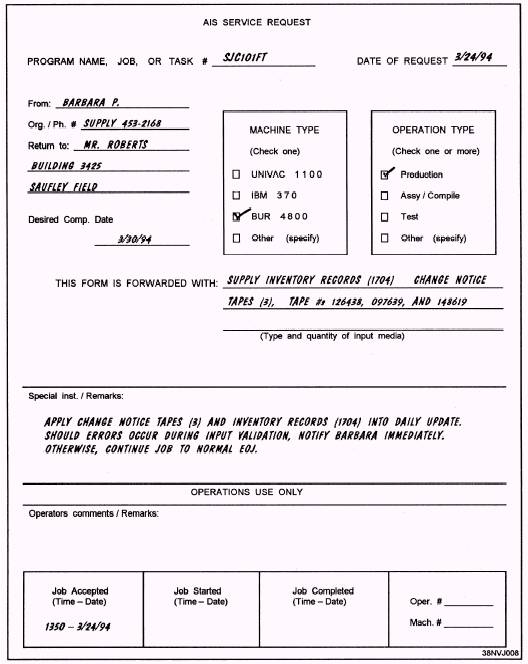
Your operational requirements will include some or all of the following tasks: l Receive user job requests. l Maintain input and output control logs. l Verify inputs to be processed to ensure they are correct and in accordance with the run folder or run instructions. l Make system control language (SCL) run stream changes as required for correct data processing of the user's runs. l Input the user's run package (jobs) to the computer operations personnel according to a schedule. l Monitor the jobs in progress to ensure that all data are processed and that all processing steps have been properly performed. l Balance the number of records input relative to the number output. l Verify the format and the number of copies of each printed output in accordance with instructions in the run folder. l Reconcile processing discrepancies and inconsistencies. l Ensure that printed outputs are complete, properly collated, and assembled. l Arrange for distribution of outputs to authorized users. l Operate a variety of auxiliary equipment: copying machines, decollators, tape cleaners, CRT terminals, and so on. l Become familiar with the basic operations of the AIS computer facility. Now that you are familiar with the process and with operational responsibilities, let's look at the parts: transmittal forms, input control logs, job preparation, scheduling, monitoring, and output products. Processing AIS Service Requests Your first task may be to receive jobs from users. Each job will have an AIS service request of some type. A typical AIS service request is illustrated in figure 1-2. In looking over this form, you will notice that it provides you with such information as the following: l The program name, job number, or task number that is used to reference a particular job application; l The user's name, department and/or organization, and phone number; o Where and/or to whom the output is to be sent; l The desired completion date of the job; l The computer (machine type) to be used for the job. l The type of operation to be performed: production, test, assemble, compile, and so on; l The quantity and type of input media and/or material to be used: magnetic tape, blank checks, and so on; and l Any special instructions or remarks the user wishes to include. You will also notice that the lower portion of the AIS service request (see figure 1-2) is reserved for operations use only. This is where you enter the time and date that the job was accepted for processing (lower left-hand corner). The remaining blocks are used by the people in operations to indicate when the job started, when it was completed, along with any significant comments about the job during the time it was run. If, while reviewing the user's request, you happen to come across a discrepancy or find something that is incomplete or unclear, be sure to bring it to the user's attention. Just remember that throughout the course of your conversation, you are to be tactful and diplomatic. You must always keep in mind that you are representing your command, and the image you project, both personally and professionally, is as important to your job as the work that is being submitted. The key word is communication, NOT confrontation. Once you have accepted the user's request, you make the necessary entries in the job control log. Job Control Log A job control log is important, especially when you deal with multiple users. It will be up to you to keep an up-to-date record of all jobs received for processing. A job control log will serve as a continuous point of
Figure 1-2.-A typical AIS service request.
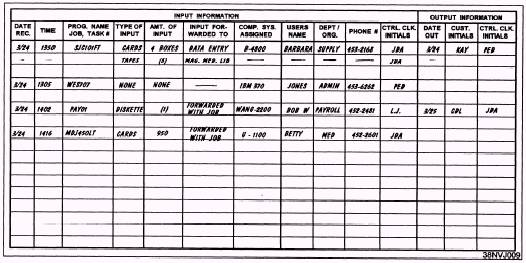
Figure 1-3.-Job control log. reference. Figure 1-3 illustrates a typical layout of input control information. When you receive a job, make an initial entry in the log. As the job progresses, make additional entries as appropriate. For example, if you send input to data entry to be keyed, record this in the log. In the event a job or its accompanying input becomes side-tracked, misplaced, or lost, you still have a means of tracking down the job or its input. The log can be of great help. It points out such things as when the job was submitted, the disposition of the input media, the location or the computer system to which the job was assigned, the progress (number of steps) the job has already gone through, the type and amount of input submitted, the person who accepted the job, and soon. If you are still unable to locate the missing item, you are able to notify the user. That person's name, organization, and phone number were initial entries in the log. Job Preparation To properly prepare the user's job (specifically the input) for processing, you must have a certain amount of information. This information is located in what is called a task folder, job folder, run folder, or run procedure. Do not confuse these with run book, run manual, or run instructions, which provide computer program operating instructions for the operators. The task folder provides you with such things as a run sheet, control parameters, and output requirements. |
 |
|
|