Custom Search
|
|
  |
|
|
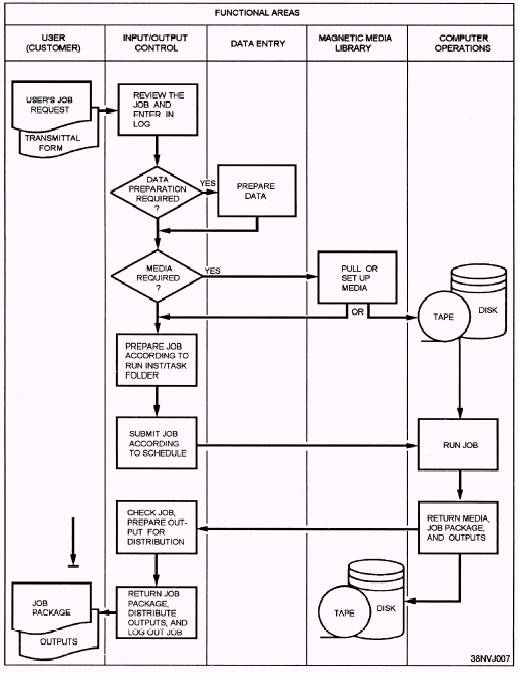
I/O CONTROL PROCEDURES I/O, as you know, stands for input/output. The people who perform I/O functions are called control clerks, I/O control clerks, job-staging clerks, distribution clerks, or computer aids. In short, these are the people who are responsible for the quality and control of data processing input and output media and products. They ensure that the data to be processed meets all the requirements as outlined in the input criteria (instructions and procedures), that all data are processed, that all processing steps are performed, that the output products are distributed to the appropriate users once they are complete. To be an efficient and effective I/O control clerk, you should be able to work on your own with a minimum of supervision; work well with other people; display tact and diplomacy; be a good communicator; use sound judgment; be logical, methodical, and persuasive; and most of all be able to respond to users' requests. Although you may manage to stay out of the limelight in this job, you do perform an integral function in the overall ADP operation. The importance and impact you have (whether it be aboard ship or ashore) is far-reaching and invaluable. Most opinions formulated by the AIS users (customers) are based on the quality of their output products and their personal contact with you as an I/O control clerk. Your attitude toward your job and its importance is seen not only by the customer, but also by your fellow workers, supervisor, and, in some cases, management. The quality of your work will be your signature when dealing with other AIS personnel and customers. I/O control is a process. Your job will be to follow your installation's procedures. Although the procedures may differ from one installation to another, they all require the same knowledge and skills. As an I/O control clerk, you act as the middle person between the user (customer) and the computer. Normally, the users come to you with a transmittal or request form and sometimes with their input-source documents, magnetic tapes, diskettes, and so on. Before accepting and logging in their jobs, take a few moments to look over the transmittal form. Be sure that all the necessary entries are properly filled in, that they are readable, and that any special instructions are understandable. It is better to clear up any misunderstandings right then and there, rather than having to contact the user again later and possibly cause a delay in the job getting on the computer. Never be embarrassed to ask questions. You must remember that many of the users you come in contact with are non-ADP oriented; therefore, it is up to you to help them understand the process and its requirements. Once you have logged the job in, you may work with data entry to prepare data or programs; then with the media library to pull the needed tapes or disks; and then with computer operations to have the job run. Once the job has been run on the computer, you may check the output products. When you are sure the outputs are OK, you distribute them according to instructions, log the job out, and file or return the job materials to the user. Study figure 1-1 for a few moments. It will help you see how the work flows and how you, as an I/O control clerk, fit in the picture. The functional areas are listed across the top of the figure. As you enter the level of middle management, you will be required to take on added duties and additional responsibilities. You will be a technical administrator, and you will provide support to management. You will use your expertise to evaluate current procedures and equipment and to make recommendations for improvements to operations. This includes estimating future equipment needs.
Figure 1-1.-Typical I/O control workflow. |
 |
|
|