| Tweet |

Custom Search
|
|
 
|
||
|
USING PREDEFINED FUNCTIONS Some of the more commonly used mathematical functions have been predefined in the BASIC language. They were presented in Chapter 2 and are listed in Appendix I. To use them, all you have to do is specify the function and provide an argument (the number or variable, on which the function is to be executed).Examples: Calculate and Print the Square Root of 16
Calculate the Absolute Value of XY
DEFINING YOUR OWN FUNCTIONS In addition to the predefine functions, BASIC allows you to define your own functions within a program. The statement for defining functions is the DEF (DEFINE) statement.The DEF statement consists of a statement number, the keyword DEF and the function definition. The function definition consists of the function name, followed by an equal sign, followed by a constant, variable, or expression. If the function requires an argument, then it must appear immediately after the function name, enclosed in parentheses. The following example shows how a function to convert Fahrenheit to Celsius could be defined.Example:
Both numeric and string functions may be defined with the DEF state-ment. Numeric functions return numeric values and string functions return string values. Numeric function names must consist of three letters, the first two must be FN, followed by any single letter of the alphabet (A-Z). Therefore, as many as 26 separate numeric functions can be defined in a single program (FNA, FNB,...FNZ). String functions must consist of three letters followed by a dollar sign. Like numeric functions, the first two letters must be FN. Up to 26 separate string functions may be defined in a single program (FNA$, FNB$,...FNZ$). Numeric and string functions having the same three letters (FNA and FNA$) are con-sidered as two different functions and may appear in the same program.Some important things to remember about user defined functions are: than that of the first reference to the function. The expression in a DEF statement is evaluated only when the defined function is referenced.If the execution of a program reaches a line containing a DEF statement, it proceeds to the next line with no other effect.A function definition can reference other defined functions, but not itself.A function may be defined only once in a program. Predefine functions may be used in arguments of user defined functions.Subscripted variables are not permitted as arguments in a function definition.The following example shows a user defined function to calculate the area of a circle.Example:
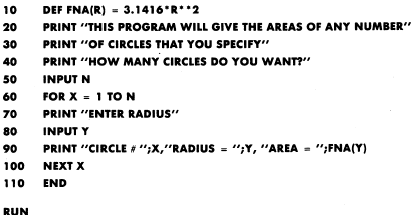
You can define your own functions, include them, and use them in your program. The following program shows the use of this function in a program to compute the areas of any number of circles.Example:
The function to compute the area of a circle is defined in line 10. The PRINT statement, line 90, References the defined function to print the area of the circle. The variable name (R) used in the DEF statement is not the same as the one (Y) used in the PRINT statement where the function is referenced, rather it corresponds to the variable name used in the INPUT statement, line 80 |
 
|
|
|
||