Custom Search
|
|
 
|
||
|
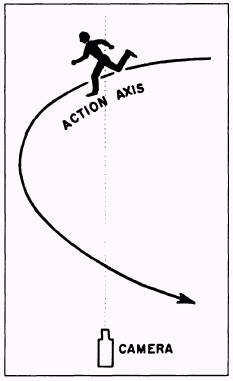
Constant screen direction shows subjects moving in one direction only. When one subject moves in the same direction through a series of shots, progression is represented. Once screen direction has been established, it should be maintained until a change in direction can be explained. When a shot suddenly shows a subject traveling in the opposite direction to the previous shot, the audience will get the impression that the subject has turned around and is heading back to the starting point. Any change in screen direction must be explained. One way to change screen direction (for example, a head-on to a tail-away) and explain the change to the viewers is to film the subject in the following sequence. First, record a head-on shot. Secondly, cut the shot to a three-quarter angle of the subject moving left to right. Next, cut the three-quarter angle to a view of the subject crossing the screen, then to a rear three-quarter angle of the subject. Finally, cut from the rear three-quarter angle to a tail-away shot (fig. 13-12). A way to maintain constant screen direction is to use the action-axis technique. An action axis is nothing more than an imaginary line created by subject movement.
Figure 13-13. Subject crossing the action axis. When the camera is positioned on the same side of the action axis each time it is moved for a series of shots, the screen direction remains the same throughout the series. The relationship between the camera and subject movement or action axis remains the same if the camera does not cross the action axis. Once established, screen direction can be maintained by keeping the camera on the same side of the action axis. When constant screen direction cannot be maintained, any change in direction MUST be visually explained to the audience. Constant screen direction changes can be explained in the following ways: Show the moving subject actually changing direction. This is the most effective way to change screen direction because the audience sees the subject change direction and there is no doubt in their minds how it took place. Film the moving subject crossing the action axis on a corner or curve. This permits the subject to exit the frame on the wrong side, thus changing screen direction (fig. 13-13). Use a reaction closeup shot of an observer viewing the movement in the new direction. A reaction close-up serves as a neutral shot and distracts the audience, so the change in screen direction can take place. A reaction close-up, in this situation, could be a close-up of an observer's head turning to follow the movement of the previous scene. The head of the observer should turn as though the action is taking place behind the camera, thus putting the camera between the action and the observer. |
 |
|
|
||